
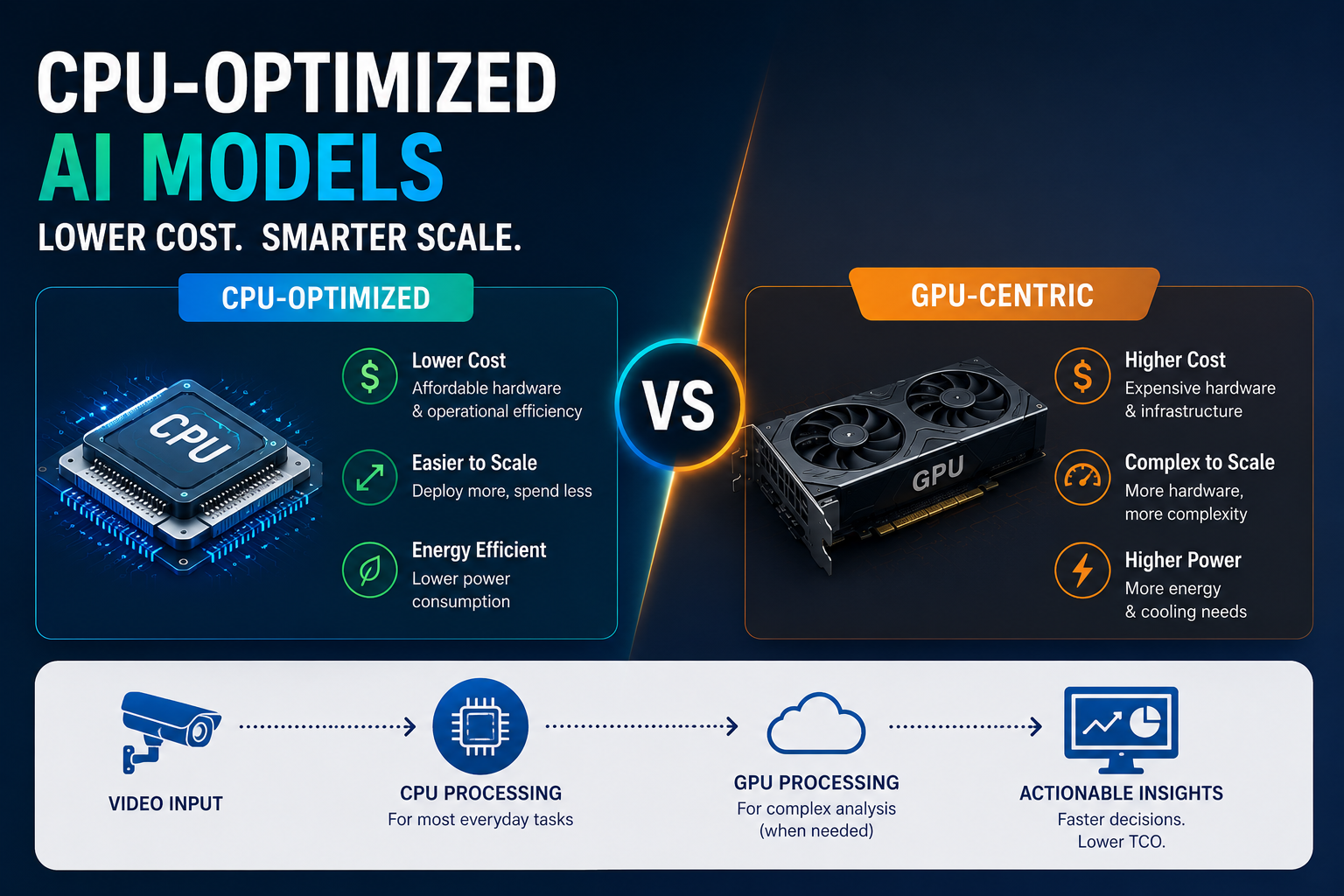
How CPU-Optimised AI Models Are Redefining Cost in Video Analytics Systems
Introduction: The GPU-First Assumption Is Being Challenged
For years, the default belief in video analytics has been simple:
If you want performance, you need GPUs.
This assumption shaped:
- System architecture
- Budget planning
- Vendor offerings
But as deployments scale, teams are running into a hard constraint:
GPU-driven systems are powerful, but they are expensive, rigid, and often overkill for many real-world workloads.
This is where a quiet shift is happening.
CPU-optimised AI models are not trying to replace GPUs entirely.
They are redefining where and how compute should be used.
And in doing so, they are fundamentally changing the cost structure of video analytics systems.
The Real Cost Structure of Video Analytics
Before understanding CPUs, it is important to understand where costs actually come from.
Most teams think cost = hardware.
But in production systems, cost includes:
- Compute (GPU or CPU)
- Infrastructure scaling
- Power consumption
- Cooling requirements
- Maintenance and upgrades
- Deployment complexity
As systems grow, these costs compound.
The challenge is not just building a system that works.
It is building one that remains economically viable at scale.
Why GPU-Centric Architectures Become Expensive
GPUs are designed for parallel computation.
They excel at:
- Large models
- High-throughput inference
- Complex visual tasks
But they also introduce:
1. High Initial Investment
GPU hardware is significantly more expensive than CPU-based systems.
2. Underutilisation
In many deployments:
- GPUs are not fully utilized
- Workloads are bursty, not constant
3. Scaling Constraints
Adding more cameras often requires:
- Additional GPU units
- Complex orchestration
4. Operational Overhead
GPU systems require:
- Specialized drivers
- Monitoring
- Cooling and power management
These factors increase total cost beyond just hardware.
The Rise of CPU-Optimised Models
Advancements in model design have made it possible to run efficient AI workloads on CPUs.
These models are:
- Smaller in size
- Optimised for low-latency inference
- Designed for efficient memory usage
They leverage:
- Model compression techniques
- Efficient architectures
- Hardware-aware optimisations
The goal is not maximum performance.
It is maximum efficiency per unit cost.
Why CPUs Make Economic Sense
CPUs are:
- Widely available
- Cost-effective
- Easier to deploy
- More flexible in general-purpose workloads
This makes them ideal for:
- Distributed systems
- Edge deployments
- Moderate-complexity tasks
When paired with optimised models, CPUs can handle a significant portion of video analytics workloads.
The Shift From Peak Performance to Cost Efficiency
Traditional systems focused on:
- Maximizing throughput
- Achieving highest possible accuracy
Modern systems are shifting toward:
- Optimizing cost per insight
- Balancing performance with efficiency
This is where CPU-based systems shine.
They may not match GPU performance in raw speed, but they deliver:
- Sufficient accuracy
- Lower cost
- Better scalability
Workload Segmentation: The Key Insight
Not all video analytics tasks require heavy computation.
Tasks can be divided into:
1. Lightweight Tasks
- Object presence detection
- Motion detection
- Basic classification
2. Moderate Tasks
- Multi-object tracking
- Behavior recognition
3. Heavy Tasks
- Deep scene understanding
- Complex multi-modal analysis
CPU-optimised models are well-suited for:
- Lightweight and moderate tasks
GPUs can then be reserved for:
- Heavy tasks
This division reduces overall system cost.
Distributed Compute: Moving Away From Centralised Systems
CPU-based systems enable distributed architectures.
Instead of:
- Centralised GPU clusters
You can deploy:
- Multiple CPU nodes closer to data sources
Benefits include:
- Reduced data movement
- Lower latency
- Better fault tolerance
This approach aligns well with real-world deployments.
Energy Efficiency: The Overlooked Cost Factor
Power consumption is a major operational cost.
GPU systems:
- Consume more power
- Generate more heat
CPU systems:
- Are generally more energy-efficient
- Require less cooling
Over time, this leads to:
- Lower operational expenses
- More sustainable deployments
Scalability Without Exponential Cost Growth
In GPU-centric systems:
- Scaling often means adding expensive hardware
In CPU-based systems:
- Scaling can be more incremental
You can:
- Add nodes gradually
- Distribute workloads efficiently
This creates:
- Linear cost growth instead of exponential
The Role of Model Design
CPU optimisation is not just about hardware.
It requires rethinking model design.
Key techniques include:
Model Quantisation
Reducing precision to improve speed and reduce memory usage.
Pruning
Removing unnecessary parameters to streamline computation.
Efficient Architectures
Designing models specifically for lower compute environments.
These techniques allow models to:
- Run faster on CPUs
- Maintain acceptable accuracy
Tradeoffs: What You Give Up
CPU-based systems are not perfect.
They involve tradeoffs.
1. Lower Peak Performance
They may not handle extremely complex tasks as efficiently.
2. Limited Parallelism
CPUs cannot match GPUs in massive parallel processing.
3. Model Constraints
Some advanced models still require GPU support.
Understanding these limitations is critical.
Where CPU-Optimised Models Excel
They perform well in:
- Retail analytics
- Industrial monitoring
- Smart surveillance
- Basic anomaly detection
These use cases prioritize:
- Consistency
- Cost efficiency
- Scalability
Over raw computational power.
Hybrid Architectures: The Best of Both Worlds
The most effective systems combine:
- CPU-based processing for common tasks
- GPU-based processing for complex analysis
This allows:
- Cost optimisation
- Performance flexibility
The key is intelligent workload allocation.
Common Mistakes Teams Make
Overestimating Compute Needs
Not every task requires high-end hardware.
Ignoring Operational Costs
Focusing only on initial setup leads to surprises later.
Using GPUs for Everything
This leads to inefficiency and higher costs.
Neglecting Model Optimisation
Hardware alone cannot solve inefficiency.
A Practical Cost Mindset
Instead of asking:
“What is the fastest system we can build?”
Ask:
“What is the most cost-effective system that meets our requirements?”
This shift leads to better long-term outcomes.
The Strategic Insight
The future of video analytics is not about choosing between CPUs and GPUs.
It is about:
- Using each where it makes sense
- Designing systems around efficiency
- Aligning compute with actual workload needs
CPU-optimised models are enabling this shift.
The Bigger Picture: Democratising Video AI
Lower costs mean:
- More organisations can adopt AI
- Smaller deployments become viable
- Innovation becomes more accessible
This expands the reach of video analytics beyond large enterprises.
Final Takeaway
CPU-optimised AI models are not replacing GPUs.
They are redefining how systems are designed.
They shift the focus from:
- Maximum performance
To:
- Maximum efficiency
In doing so, they enable systems that are:
- Scalable
- Cost-effective
- Practical for real-world deployment
The real advantage is not just saving money.
It is building systems that can grow without becoming unsustainable.
And that is what ultimately determines success in video analytics.